
Try Unity Industry for 30 days for free

Streamline your 3D data prep
With 70+ formats supported, Asset Transformer preps files for any 3D or visualization use.
- Convert any 3D file of any type – mesh, CAD, BIM, and point cloud – into standard 3D formats.
- Optimize complex 3D models to create real-time application-ready assets.
- Automate preparation and processing of 3D, CAD and point cloud pipelines.
Key benefits
Import & convert any format
Bring models in with geometry, hierarchy, and metadata preserved and turn 70+ CAD, BIM, mesh, and point-cloud formats into clean, standard, Unity-ready 3D.
Optimize for real-time
Create LODs and UVs, decimate and merge meshes so heavy models run smoothly on any device.
Automate the busywork
Repeat prep across large assemblies with customizable transformation pipelines.

CASE STUDY
Faster data ingest for Autoliv
By leveraging Asset Transformer, Autoliv’s creative pipeline was revolutionized. The time for CAD data transfer and optimization was reduced from four days per individual product down to just six hours.
Flexible to fit any 3D workflow
Asset Transformer comes in several product configurations, so you can build it into your existing tech stack and workflows; no rip-and-replace. Contact us for pricing.

Asset Transformer Toolkit
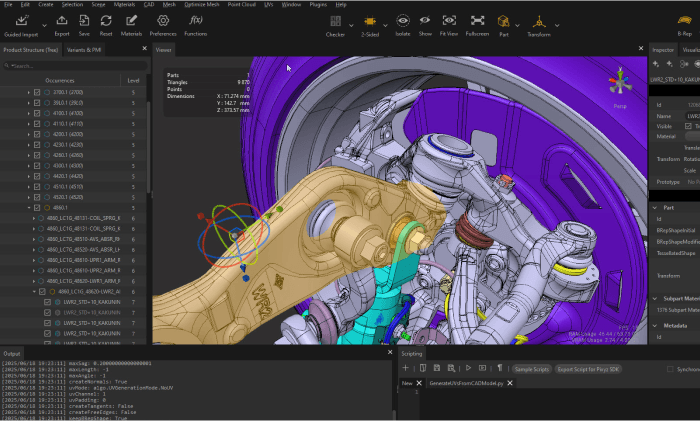
Easy plugin to work right inside Unity's Editor. Included in Unity Industry.


Do more with Unity
Asset Transformer works alongside other Unity solutions, so your optimized assets flow straight into your live applications and collaborative spaces.
Pipeline Automation
Run transformations at scale and build them into more complex workflows. Automatically update your live 3D applications simply by transforming the source CAD files from your PLM. Learn more.

Asset Manager
Included with Unity Industry. Asset Transformer powers automatic asset previews and metadata generation, one-click asset preparation for common export formats, and preps large assets for 3D data streaming. Learn more.

Unity Editor
Import and optimize CAD directly inside the Unity Editor (included with Unity Industry license). Learn more.

Frequently asked questions
You can try Asset Transformer any time through Pipeline Automation workflows (transformations are free during beta and you only pay for pipeline compute if you exceed your included license allowance). Asset Transformer Toolkit is included in the 30-day free trial of Unity Industry, alongside Unity's suite of tools for advanced visualization, simulation, AR/VR, and interactive applications. To evaluate Asset Transformer SDK or Studio, contact us to learn more.
Asset Transformer Toolkit is a Unity package natively supported in the Unity Editor. Asset Transformer Studio and SDK export to Unity-compatible 3D formats such as FBX, glTF, or OBJ.
Asset Transformer supports more than 70 file formats and extensions for various industries, including CATIA, JT, STEP, IFC, PVZ, NWD, USD and glTF. See the full list of supported files here.
CAD files rely on exact parametric surfaces (called BRep, or NURBS), whereas real-time 3D engines like Unity need triangular representations of 3D objects (called meshes). Asset Transformer translates CAD data into mesh data.
For basic interactive workflows, use Asset Transformer Toolkit to import CAD directly into the Editor. For heavy data, use Asset Transformer Studio or SDK to preprocess. For quick one-off jobs, use Asset Transformer in Asset Manager via the Optimize & Convert quick tool. For building transformations into larger workflows (e.g. automating the entire process of CAD ingestion, transformation, and export), use Pipeline Automation.
Asset Transformer offers many methods to simplify your model, including:
- Reducing the number of triangles through decimation or Remove Occluded Geometries
- Reducing the complexity of the hierarchy and number of entities in your scenes (sub-meshes with merge or combine)
- Creating a new optimized GameObject through retopology (proxy-mesh + bake) or Create Impostor / Billboard
Asset Transformer SDK runs on-premises or in your own cloud environment, so your data stays inside your own infrastructure. It ships with Python libraries, a C# .NET NuGet package, Docker-ready images, and Terraform scripts, with access to all core Asset Transformer algorithms for building custom, automated pipelines.
Asset Transformer via Pipeline Automation: metered, see compute costs on our pricing page.
Toolkit: included with Unity Industry.
Studio and SDK: contact us.
Asset Transformer Toolkit is included with a Unity Industry subscription. Asset Transformer Studio and Asset Transformer SDK require a separate entitlement from Unity licenses.
If you wish to purchase Asset Transformer Toolkit, we recommend Unity Industry, which includes Unity Enterprise, the Asset Transformer Toolkit and an Industry Success package complete with dedicated Unity Advisor and access to on-demand training.
You can also use Asset Transformer Studio and/or Asset Transformer SDK to prepare data for use in real-time 3D, then export that data for use with Unity.
Asset Transformer is the evolution of Pixyz, the 3D data optimization technology Unity has offered for years.
Pixyz Scenario Processor is no longer available for download, but existing customers keep access to the technology. We recommend migrating to Asset Transformer SDK; the Python APIs are closely aligned, so most scripts carry over. Pixyz Plugin 2.0 users should move to Asset Transformer Toolkit, and Plugin 2.0 remains installable from Package Manager in the meantime. Note that Studio plugins are not compatible with SDK. See more about the licensing migration here.